

Incognito Mode Does Not Make You Invisible
Private browsing can keep certain browsing information off your device, but it does not make you anonymous online. Understanding what incognito mode actually protects can help you make smarter privacy decisions.
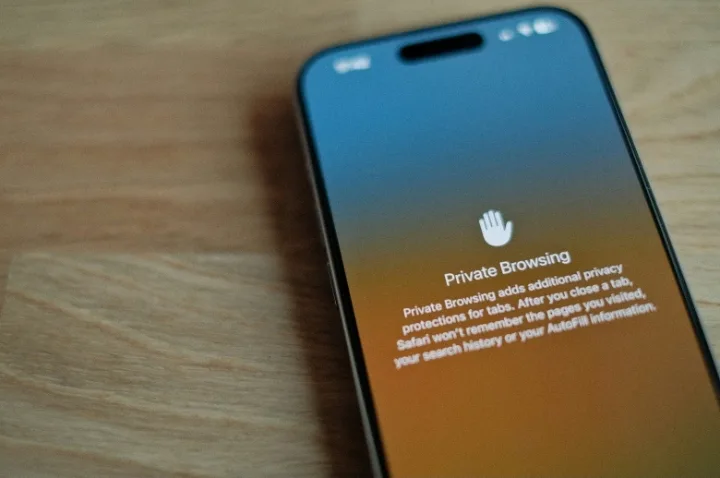
Incognito Mode Does Not Make You Invisible
Private browsing is one of those browser features that many people use without fully understanding what it actually does.
You open an incognito or private window, browse a few websites, close it, and assume your activity has disappeared.
Not quite.
Private browsing can be useful, especially on shared devices, but it provides a much narrower layer of privacy than many people expect.
The important question is not “Does incognito mode hide me?”
It is “What exactly does incognito mode hide?”
What Private Browsing Actually Does
When you open a private browsing window, your browser generally avoids keeping certain information from that session in its normal local browsing history and storage after the session ends.
Depending on the browser, this can include things such as:
- Browsing history
- Cookies and temporary site data
- Information entered into some forms
- Cached website data
- Search activity stored locally by the browser
This can be particularly useful when you are using a shared computer and do not want your browsing session appearing in the browser's normal history.
But there is an important distinction:
Private browsing mainly limits what is stored locally on your device. It does not make your activity disappear from the internet.
What Incognito Mode Does Not Hide
Private browsing does not automatically make you anonymous.
Websites can still receive information about your visit, and your internet service provider or network administrator may still be able to observe network activity.
Your IP address is also not automatically hidden simply because you opened a private window.
There is another important example.
If you sign into your Google account, social media account, email, or another online service while using a private window, that service can still associate activity with your account.
Private browsing also does not protect you from:
- Phishing websites
- Malware
- Unsafe downloads
- Weak or reused passwords
- Data you voluntarily submit to websites
- Tracking associated with an account you are signed into
- Monitoring on certain managed networks
In other words, private does not mean invisible.
So Why Is Incognito Mode Useful?
The limitations do not make private browsing useless.
There are plenty of situations where it makes sense.
Using a Shared Computer
If you are using a family computer, school computer, library computer, or another shared device, private browsing can help prevent your session from being added to the browser's normal history.
Testing a Website
Developers can use private windows to test how a website behaves without some existing cookies or stored session data interfering with the test.
It can be a quick way to determine whether a problem is related to an existing browser session.
Using Multiple Accounts
Private windows can sometimes make it easier to temporarily access another account without signing out of your primary account.
Troubleshooting Websites
If a website behaves strangely, opening it in a private window can help identify whether stored cookies, cache, or browser extensions are contributing to the problem.
It is a simple troubleshooting step before reaching for more complicated solutions.
Private Browsing Is Not the Same as a VPN
This is another common misunderstanding.
A private browsing window and a VPN solve different problems.
Private browsing primarily changes how the browser handles information locally during and after a session.
A VPN creates an encrypted connection between your device and a VPN server and can change the IP address presented to websites. However, a VPN does not automatically make you anonymous either, and you still have to trust the VPN provider with aspects of your network traffic.
So switching from incognito mode to a VPN is not simply moving from "a little privacy" to "complete privacy."
Privacy tools each address different parts of the problem.
Better Privacy Requires Better Habits
If you want to improve your privacy online, do not rely on a single browser setting.
Instead, build a few simple habits.
Review Your Browser Permissions
Check which websites have access to things such as:
- Location
- Camera
- Microphone
- Notifications
- Pop-ups
- Other browser permissions
If a website no longer needs a permission, consider removing it.
Use Strong, Unique Passwords
Private browsing cannot protect an account from a compromised password.
Using unique passwords for important accounts reduces the damage that can occur when one password is exposed.
A password manager can also make this easier to manage.
Turn On Multi-Factor Authentication
Multi-factor authentication adds another layer of protection beyond your password.
Even if someone obtains your password, they may still need the additional authentication factor to access the account.
Keep Your Browser Updated
Browser updates are not only about new features and interface changes.
They can also contain security fixes, which is one reason keeping your browser and operating system updated is an important security habit.
Think Before Granting Access
When a website asks for access to your location, camera, microphone, or notifications, stop and ask whether the permission is actually necessary.
A website does not automatically need every permission it requests.
The Bigger Lesson About Privacy
The biggest problem with incognito mode is not the feature itself.
It is the misunderstanding around it.
Privacy is not a single switch that you turn on.
It is a combination of:
- Browser settings
- Account security
- Device security
- Network security
- App permissions
- The information you choose to share
- The services you choose to use
Once you understand what each tool actually does, it becomes much easier to make sensible decisions about your digital privacy.
Final Thoughts
Incognito mode is useful, but its name can create the wrong impression.
It can help reduce the amount of browsing information stored locally on your device, but it does not erase your online activity or make you completely anonymous.
So the next time you open a private window, remember what it is actually doing.
It can give you a more private browsing session. It cannot make you invisible.

24 followers
Comments0
No comments yet. Start the conversation!